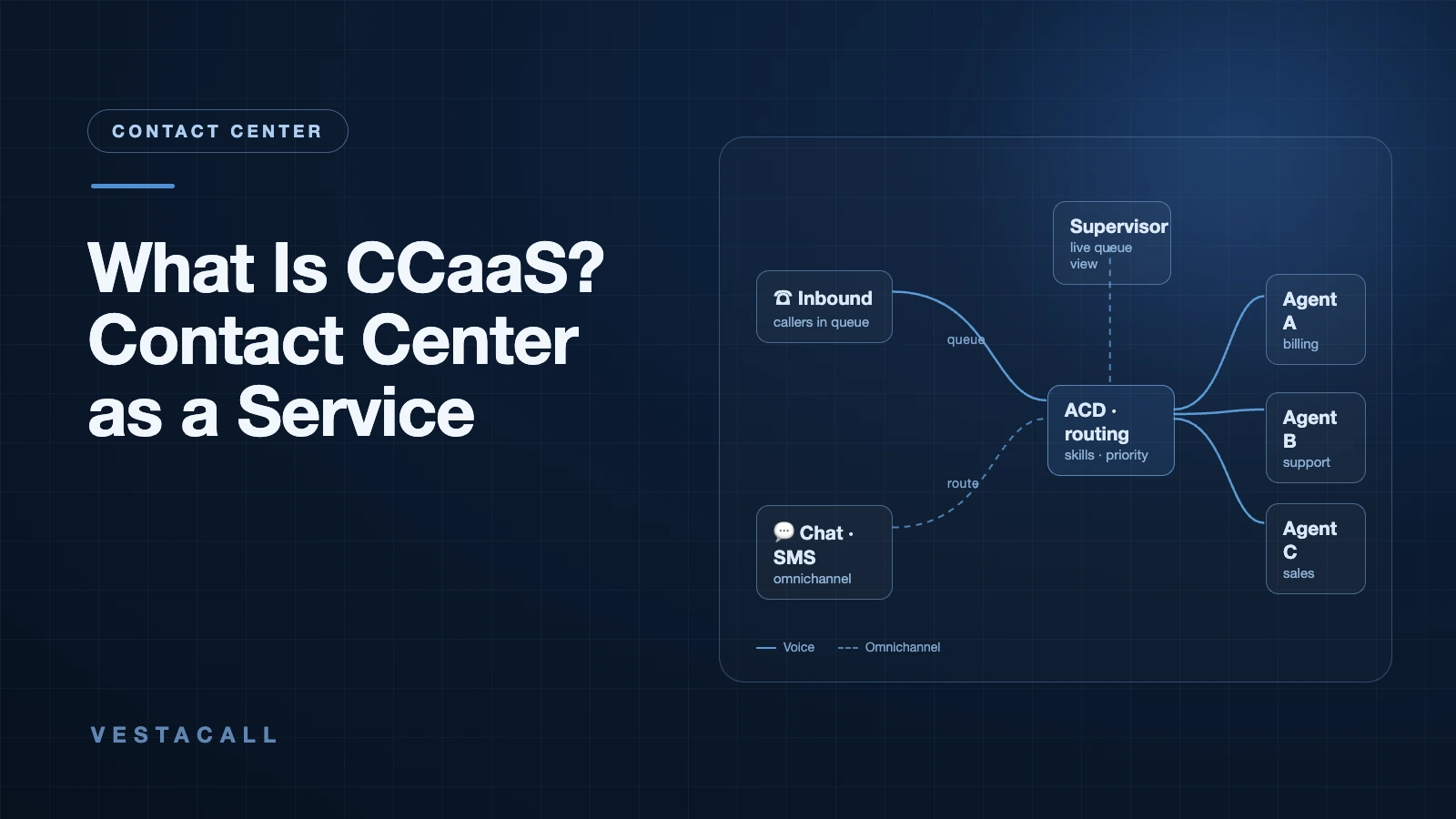
Picture a Monday at 9am. Forty people are calling in. Half your agents are still logging on, three of those callers have a billing problem only two people on your team can solve, and one of them has already been on hold for six minutes.
A phone system has no answer for that. A contact center does.
That’s the whole idea behind CCaaS — Contact Center as a Service. It’s the software layer that turns a flood of inbound calls into an orderly, measurable queue, and it runs in the cloud instead of a server room. No dialer hardware to buy. No ACD appliance to maintain. You rent the operation as software and pay per agent.
And the market is voting with its wallet. According to Fortune Business Insights, the global CCaaS market sat at about $8.33 billion in 2026 and is projected to reach $30.15 billion by 2034 — a 17.4% compound annual growth rate. Grand View Research is even more bullish, pegging the growth at 22.3% a year. Both numbers tell the same story: the on-premise contact center is being retired, fast.
What CCaaS actually does
Strip away the acronyms and a contact center does four jobs.
It queues callers when there are more of them than free agents. It routes each one to the right person — by skill, by language, by priority, by whoever’s been idle longest. It gives supervisors a live view so they can see the queue backing up and react before customers start hanging up. And it records and scores calls so you can actually coach people instead of guessing.
CCaaS is all four of those, delivered as a subscription. The pieces have their own names:
- The smart routing and IVR layer decides where each call goes. (Under the hood, that routing engine is the ACD — automatic call distribution.)
- A power dialer handles the outbound side for sales and collections.
- QA monitoring scores calls so coaching has something to stand on.
- Workforce management forecasts volume and builds the schedules to match it.
Put them together and you have a contact center. VestaCall bundles the lot into the Cloud Contact Center — and there’s a fuller overview on the CCaaS platform page if you want the map before the detail.
CCaaS vs UCaaS — the difference that trips people up
This is the question that comes up every time, so let’s settle it.
UCaaS — Unified Communications as a Service — is about how your whole company talks. Phone, team chat, video, SMS, for everyone on staff. It replaces a PBX plus a pile of scattered apps.
CCaaS is about how a queue runs. It’s for the subset of your people whose entire job is answering or making calls all day — support, sales, collections. It adds routing, agent scoring, and live supervision that a general phone system simply doesn’t have.
Here’s the quick test. Does anyone on your team sit in a line waiting for the next call? If no, you want UCaaS. If yes — if the call volume is the job rather than a side effect of it — you want CCaaS. Many businesses need both, which is why some providers run them on one platform instead of making you stitch two together.
| UCaaS | CCaaS | |
|---|---|---|
| Built for | Everyone in the company | Agents working a queue |
| Core job | Communicate | Handle call volume |
| Key features | Calls, chat, video, SMS | Queues, routing, QA, WFM |
| Who it’s for | A marketing agency | A 50-seat support team |
When you actually need it
You don’t need a contact center because you have phones. You need one because you have a queue — more callers than agents who can pick up right now.
That’s the line. Below it, a good business phone system with an auto-attendant is plenty. Above it, calls start stacking up, customers wait, and you lose the ability to see what’s happening until the day’s reports land. CCaaS gives you the queue, the routing, and the live view the moment call volume outgrows “someone will grab it.”
The old rule was that contact centers only made sense at hundreds of seats, because the hardware cost a fortune. Cloud CCaaS killed that rule. A ten-agent team can now run skills-based routing and QA without buying a single appliance. If you’ve got a queue, you can have a contact center — see how different teams use it on the inbound support page.
What to watch on pricing
Here’s the honest part, and it’s where a lot of buyers get burned.
CCaaS pricing looks simple and rarely is. Enterprise platforms often advertise a per-agent rate and then tier off the things you actually need — AI, workforce management, advanced analytics — as paid add-ons. The sticker says one number; the invoice says another. (Not every vendor does this. But enough do that you should ask.)
VestaCall includes contact center routing, QA, and agent tools from $19 per user per month, with no separate trial to activate and no self-serve signup — buying is sales-led, so you get a scoped quote rather than a surprise. When you compare, don’t compare the headline rate. Compare what’s bundled.
The honest answer
Is CCaaS worth it? Only if you have a queue. That’s not a dodge — it’s the actual answer. A five-person team where every call gets answered on the first ring doesn’t need routing logic and workforce forecasting, and selling it to them would be dishonest.
But the moment callers start waiting, the math flips. Every minute in an unmanaged queue is a customer deciding whether you’re worth it. CCaaS is how you stop guessing and start running the thing on purpose.
So — do your callers wait in line? If you’re not sure, that’s probably your answer, and it’s worth a conversation. Talk to the VestaCall sales team about what your call volume actually needs, or read call center vs contact center if you want to get the terms straight first.